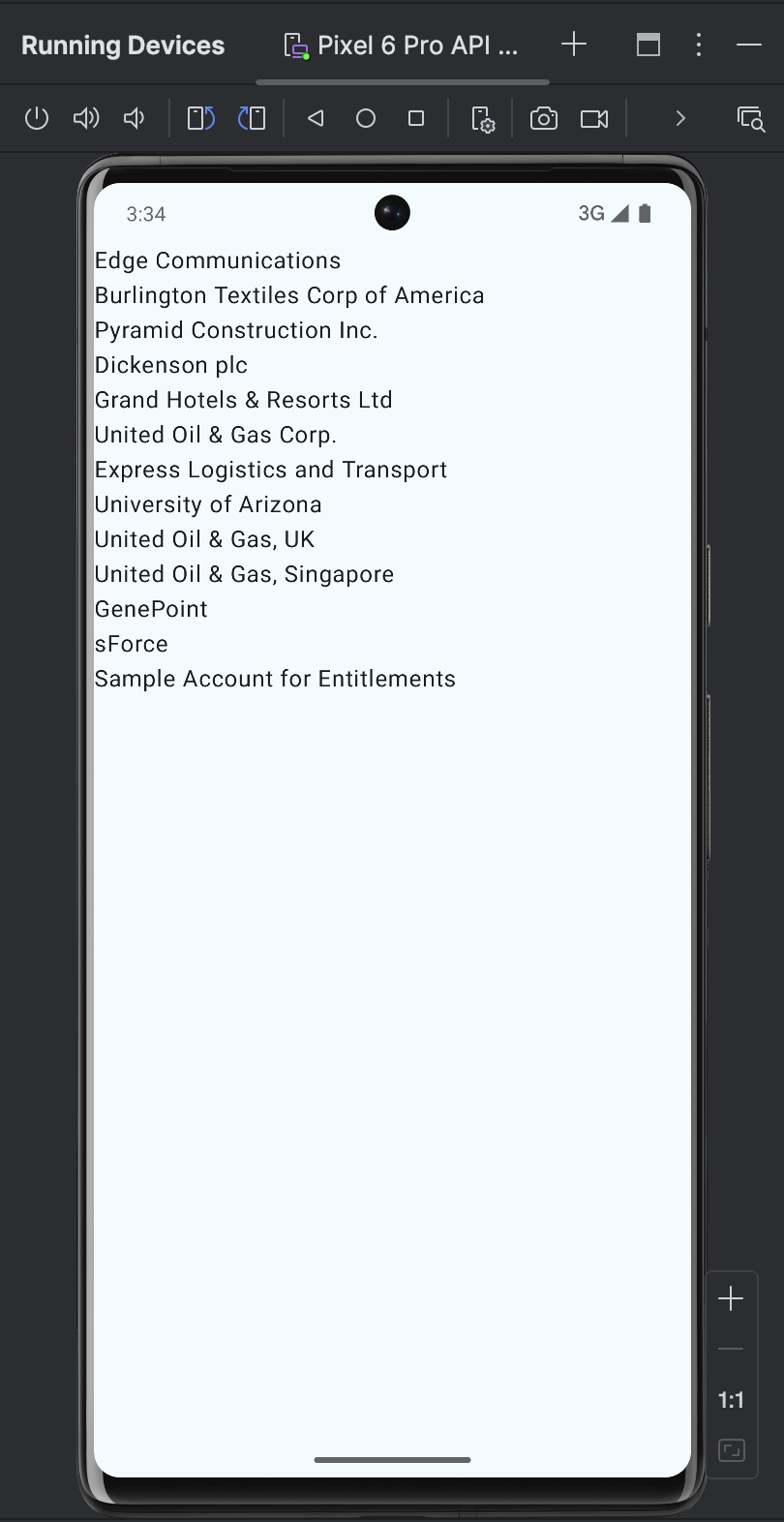
Salesforce Demo
Retrieve Salesforce Account records from a Salesforce org
Overview
This example demonstrates how to build a Salesforce service application that retrieves a list of Account records from a Salesforce org using the Salesforce REST API. The app showcases real-world usage of authenticated networking, SOQL queries, JSON data retrieval, and asynchronous calls.
| Functionality demonstrated | Technology demonstrated | Github Project |
|---|---|---|
| • Calling Salesforce REST API • Fetching Salesforce data as JSON • Returning data from Swift to Android • Displaying Salesforce data in Android UI | • Swift Android compiler • Swift4j • SwiftPM Gradle plugin • Foundation networking • Salesforce REST API | iOS Example Android Example |
The Salesforce Demo example highlights common features used when integrating with Salesforce in Swift:
- OAuth Authentication: Requesting an access token using the OAuth 2.0 token endpoint (
client_credentialsgrant) - Networking: Performing asynchronous HTTP requests using
URLSessionandURLRequest(async/await) - SOQL Queries: Querying Salesforce objects using the REST API query endpoint
- JSON Decoding: Decoding Salesforce responses using
JSONDecoderinto strongly-typed models (Account,AccountsQueryResponse) - Swift Logic Reuse on Android: Exposing Swift code to Android via Swift4j using the
@jvmbridge class and returning[Account]through a callback
APIs used:
- Salesforce OAuth 2.0 Token Endpoint – retrieves an access token
- Salesforce REST API (Query) – retrieves Account records using SOQL
Architecture: The task is split into two parts:
- Core App Logic: Salesforce integration developed in Swift using Foundation (
URLSession) for OAuth and REST API calls - User Interface: Created in Android Studio to target the Swift logic
It is strongly recommended that you complete the HelloWorld example first, as it covers essential concepts that are only briefly mentioned in this example.
Develop in Xcode
Set up the Swift project as demonstrated in the HelloWorld tutorial
- Create Xcode project
- Modify
Package.swiftfile- Add a dependency on the
Swift4jpackage, which provides the necessary functionality to expose Swift code as a Java API. - Add a dependency on the
SalesforceDemo.swiftpackage.
- Add a dependency on the
- Create class SalesforceDemo, import
Swift4j, and add@JVMannotation
See the HelloWorld for details.
The resulting Package.swift file:
// swift-tools-version: 6.2
// The swift-tools-version declares the minimum version of Swift required to build this package.

import PackageDescription

let package = Package(
    name: "SalesforceDemo",
    platforms: [
        .macOS(.v12),
        .iOS(.v18)
    ],
    products: [
        // Products define the executables and libraries a package produces, making them visible to other packages.
        .library(
            name: "SalesforceDemo",
            type: .dynamic,
            targets: ["SalesforceDemo"]
        ),
    ],
    dependencies: [
            .package(url: "https://github.com/scade-platform/swift4j.git", from: "1.3.1")
        ],
    targets: [
        // Targets are the basic building blocks of a package, defining a module or a test suite.
        // Targets can depend on other targets in this package and products from dependencies.
        .target(
            name: "SalesforceDemo",
            dependencies: [
                          .product(name: "Swift4j", package: "swift4j")
                        ]
        ),
        .testTarget(
            name: "SalesforceDemoTests",
            dependencies: ["SalesforceDemo"]
        ),
    ]
)
SalesforceDemo class
Create Sources/SalesforceDemo/SalesforceDemo.swift file:
import Foundation
import Swift4j
import Dispatch
import os

// MARK: - Models

public struct TokenResponse: Codable {
    public let access_token: String
}

@jvm
public struct Account: Identifiable, Codable {
    public let id: String
    public let name: String
    public let accountNumber: String?
    public let type: String?

    enum CodingKeys: String, CodingKey {
        case id = "Id"
        case name = "Name"
        case accountNumber = "AccountNumber"
        case type = "Type"
    }
}

public struct AccountsQueryResponse: Codable {
    public let totalSize: Int
    public let done: Bool
    public let records: [Account]
}

// MARK: - Internal HTTP result holder

final class RequestResult: @unchecked Sendable {
    var data: Data?
    var response: URLResponse?
    var error: Error?
}

// MARK: - Salesforce API Client

public final class SalesforceAPI {

    private let clientId     = "clientId"
    private let clientSecret = "clientSecret"

    private let baseDomain   = "orgfarm-c4ae2aaf32-dev-ed.develop.my.salesforce.com"
    private let apiVersion   = "v65.0"

    public init() {}

    public func loadAccounts() async throws -> [Account] {
        let token = try await fetchAccessToken()
        let response = try await fetchAccounts(accessToken: token)
        return response.records
    }

    // MARK: - HTTP Helper

    private func performRequest(_ request: URLRequest) async throws -> Data {
        os_log("performRequest start");

        let (data, response) = try await URLSession.shared.data(for: request);

        os_log("performRequest request completed");

        guard let httpResponse = response as? HTTPURLResponse else {
            os_log("performRequest response is not a HTTPURLResponse");

            throw NSError(
                domain: "AccountsError",
                code: -1,
                userInfo: [NSLocalizedDescriptionKey: "response is not a HTTPURLResponse"]
            )
        }

        guard 200..<300 ~= httpResponse.statusCode else {
            let text = String(data: data, encoding: .utf8) ?? ""
            os_log("performRequest received bad status code: \(httpResponse.statusCode), error: \(text)");

            throw NSError(
                domain: "AccountsError",
                code: httpResponse.statusCode,
                userInfo: [NSLocalizedDescriptionKey: text]
            )
        }

        os_log("performRequest finished");

        return data
    }

    // MARK: - Token

    private func fetchAccessToken() async throws -> String {
        var components = URLComponents()
        components.scheme = "https"
        components.host = baseDomain
        components.path = "/services/oauth2/token"

        guard let url = components.url else {
            throw URLError(.badURL)
        }

        var request = URLRequest(url: url)
        request.httpMethod = "POST"

        var body = URLComponents()
        body.queryItems = [
            .init(name: "grant_type", value: "client_credentials"),
            .init(name: "client_id", value: clientId),
            .init(name: "client_secret", value: clientSecret)
        ]

        request.httpBody = body.percentEncodedQuery?.data(using: .utf8)
        request.setValue("application/x-www-form-urlencoded", forHTTPHeaderField: "Content-Type")

        let data = try await performRequest(request)
        return try JSONDecoder().decode(TokenResponse.self, from: data).access_token
    }

    // MARK: - Accounts

    private func fetchAccounts(accessToken: String) async throws -> AccountsQueryResponse {
        var components = URLComponents()
        components.scheme = "https"
        components.host = baseDomain
        components.path = "/services/data/\(apiVersion)/query"
        components.queryItems = [
            .init(name: "q", value: "SELECT Id, Name, AccountNumber, Type FROM Account")
        ]

        guard let url = components.url else {
            throw URLError(.badURL)
        }

        var request = URLRequest(url: url)
        request.httpMethod = "GET"
        request.setValue("Bearer \(accessToken)", forHTTPHeaderField: "Authorization")

        let data = try await performRequest(request)
        return try JSONDecoder().decode(AccountsQueryResponse.self, from: data)
    }
}

// MARK: - JVM Bridge

@jvm
public final class SalesforceBridge {
    let api = SalesforceAPI()

    public init() {}

    public func loadAccounts(callback: ([Account]) -> Void) async {
        do {
            os_log("loadAccounts started")
            let accounts = try await api.loadAccounts()
            os_log("loadAccounts received accounts: \(accounts)")
            callback(accounts)
            os_log("loadAccounts completed")
        }
        catch {
            os_log("loadAccounts error: \(error)")
            callback([])
        }
    }
}
Explanation:
- Uses Foundation (
URLSession) for all OAuth and Salesforce REST API requests - Retrieves an OAuth 2.0 access token using the
client_credentialsgrant - Executes a SOQL query to fetch Account records from Salesforce
- Encodes the retrieved Account list as a JSON string
- Exposed to Android via the
@jvmannotation using theSalesforceBridgeclass
Set up the Android project as demonstrated in the HelloWorld tutorial
- Create a new Android project
- Set up the Gradle config file in the
appdirectory- Add the Swift Packages for Gradle plugin to the project.
- Add a configuration block for the plugin.
See the HelloWorld for details.
The resulting build.gradle.kts file:
plugins {
		// The first two plugins are generated by the Android Studio wizard
    alias(libs.plugins.android.application)
    alias(libs.plugins.kotlin.android)

		// We add the Swift Packages for Gradle plugin to the project
    id("io.scade.gradle.plugins.android.swiftpm") version "latest.release"
}

android {
	// This part remains untouched and is generated by the Android Studio wizard
}

dependencies {
	// We add a dependency to the native SQLite3 library, which is required by GRDB.swift
	// This library is provided within an AAR archive and is built from official SQLite3 sources
	implementation("io.scade.android.lib:sqlite3:3.49.0")

	// This part remains untouched and is generated by the Android Studio wizard
}

swiftpm {
    path = file("../../../Packages/SalesforceDemo")
    product = "SalesforceDemo"
    javaVersion = 8
    scdAutoUpdate = true
}
Bind Swift logic to Android UI control
Now, we can open the MainActivity.kt file and implement the user interface logic. For the sake of simplicity, the example displays the list of Salesforce Account records returned from the Swift code as a JSON string.
First, we add an import statement for the SalesforceBridge class exported from the Swift package at the top of the file:
import SalesforceDemo.SalesforceBridgeNext, we add the User-Interface related logic and calling the SalesforceBridge to the MainActivity class. The complete code of the MainActivity.kt file is presented below:
package com.example.salesforcedemo

import android.os.Bundle
import androidx.activity.ComponentActivity
import androidx.activity.compose.setContent
import androidx.activity.enableEdgeToEdge
import androidx.compose.foundation.layout.fillMaxSize
import androidx.compose.foundation.layout.padding
import androidx.compose.material3.Scaffold
import androidx.compose.material3.Text
import androidx.compose.runtime.*
import androidx.compose.ui.Modifier
import androidx.compose.ui.tooling.preview.Preview
import com.example.salesforcedemo.ui.theme.SalesforceDemoTheme
import SalesforceDemo.SalesforceBridge

class MainActivity : ComponentActivity() {

    override fun onCreate(savedInstanceState: Bundle?) {
        super.onCreate(savedInstanceState)
        System.loadLibrary("SalesforceDemo")

        enableEdgeToEdge()
        setContent {
            SalesforceDemoTheme {
                Scaffold(modifier = Modifier.fillMaxSize()) { innerPadding ->
                    AccountsScreen(modifier = Modifier.padding(innerPadding))
                }
            }
        }
    }
}

@Composable
fun AccountsScreen(modifier: Modifier = Modifier) {
    var text by remember { mutableStateOf("Loading..." ) }

    LaunchedEffect(Unit) {
        try {
            val bridge = SalesforceBridge()
            val result = bridge.loadAccounts() { accounts ->
                text = accounts.joinToString("\n") { it.name }
            }
        } catch (e: Exception) {
            text = "Error: ${e.message}"
        }
    }

    Text(
        text = text,
        modifier = modifier
    )
}

@Preview(showBackground = true)
@Composable
fun AccountsScreenPreview() {
    SalesforceDemoTheme {
        AccountsScreen()
    }
}
Explanation:
- A mutable state variable holds the Salesforce Account data displayed in the UI.
- The UI is built with Jetpack Compose and renders the Account list in the
AccountsScreencomposable. - The Swift library is loaded via
System.loadLibrary("SalesforceDemo"), andSalesforceBridge.loadAccounts(callback:)is called. - The Swift code performs asynchronous OAuth authentication and Salesforce REST API requests, invoking a Kotlin callback when the Account data is available.
Run the native Swift app on Android